
features
The Things That Make SMaRTre Smarter
In the fast-paced world of real estate development, success hinges on more than just closing deals. It requires seamless coordination between sales teams, finance departments, agents, and clients. It demands real-time visibility into every transaction, accurate commission calculations, and the ability to generate documents instantly. Yet most developers still rely on a patchwork of spreadsheets, manual processes, and outdated systems that can’t keep pace with modern demands.
Enter SMaRTre – the all-in-one real estate sales monitoring and management platform built specifically for developers who refuse to let administrative overhead slow them down.
It Speaks Real Estate, Not Accounting
In SAP, a payment schedule is a set of accounting line items. In SMaRTre, a payment schedule is what it actually is: a formula-driven contract that says “15% of TSP is due as equity in 12 monthly installments starting 1 month after reservation, with a 5-day grace period and a 3% monthly penalty on unpaid amounts.”
Our Formula Engine lets admins define payment schemes in plain business language:
[ResFee]                  	→ Reservation fee lookup
[TSP] - [Discount]       	→ Net selling price
([TSP] - [Discount]) * 0.15	→ 15% equity
[totalCommission] * 0.20 → 20% commission release at Level 2 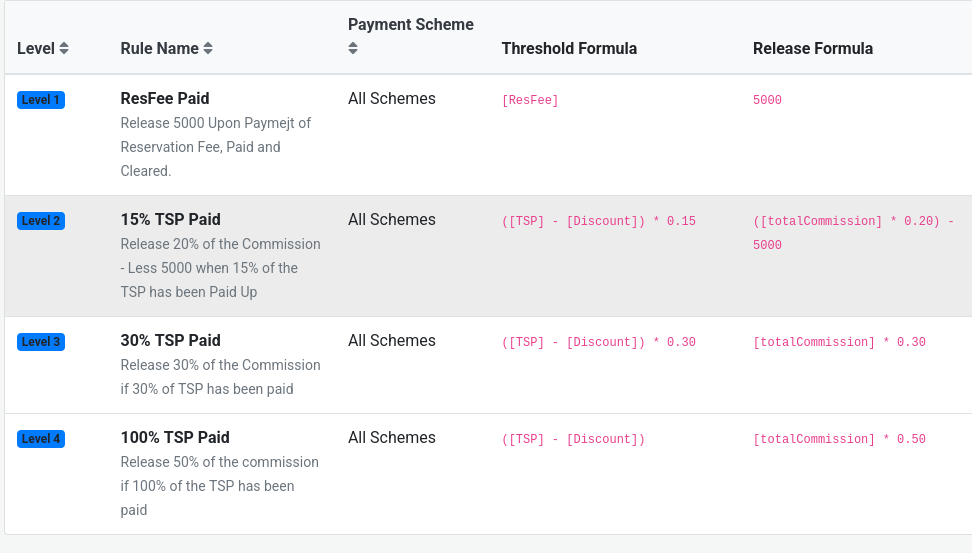
Compare this to SAP, where changing a payment scheme formula means:
- Submitting a change request
- Waiting for IT
- Testing in a sandbox
- Regression testing the entire financial close
- Waiting weeks for the change to reach production
Configure Payment Schedules Per Payment Scheme — Including Special Promos
Every project can have multiple payment schemes active simultaneously: Cash, Bank Financing, In-House Financing, Pag-IBIG, and any number of promotional variants. Each one has its own breakdown — different reservation fees, different equity percentages, different installment terms, different penalty rates.
And SMaRTre supports time-bound promos. A project can have a “Summer 2026” scheme with a 5% discount that’s only valid from March 1 to May 31, and the system automatically stops offering it once the date passes. No manual intervention. No outdated schemes being sold. No sales agent accidentally closing a deal with a promo that expired last month.
Compare to SAP/Oracle: each new payment scheme requires custom configuration, custom pricing logic, and testing. In SMaRTre, a sales admin creates a new scheme in the browser in under 5 minutes.
In SMaRTre, an admin changes the formula in the browser. It takes effect immediately.
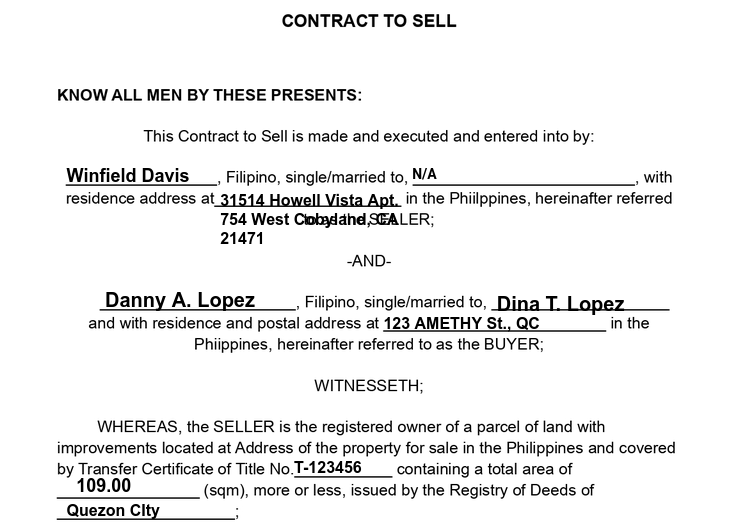
Pre-Printed Forms Are Drag-and-Drop, Not a Print Vendor Nightmare
Philippine real estate contracts are often printed on pre-printed forms (bank forms, deed forms, government forms). Every developer fights with this: hardcoded coordinates, re-printing when a layout changes, version control nightmares.
SMaRTre’s Pre-Printed Form Designer lets you:
- Upload a scanned image of the pre-printed form
- Drag-and-drop data fields onto it at exact x/y inch coordinates
- Choose font size, family, weight, alignment per field
- Preview with real sale data before printing
- Print with or without the background image (for test print vs. actual print)
No coding. No coordinates in source files. No version mismatch. Just visual editing.
Multi-Level Commission Hierarchies Are Native, Not Custom
This is where generic ERPs completely fall apart.
In Philippine real estate, a single sale often splits commission across an entire upline: a Group Manager, an Area Manager, a Senior Manager, a Manager, a Senior Agent, a Trainer, and the selling agent. Each one gets a different percentage. Each one has their own release trigger — reservation paid, 15% of TSP paid, 30% paid, 100% paid. And each release requires the buyer to have completed specific documents before the commission unlocks.
In SAP or Oracle, this requires:
- Custom ABAP/PL/SQL code
- New database tables for hierarchy
- Custom reports for each commission level
- Manual reconciliation every payday
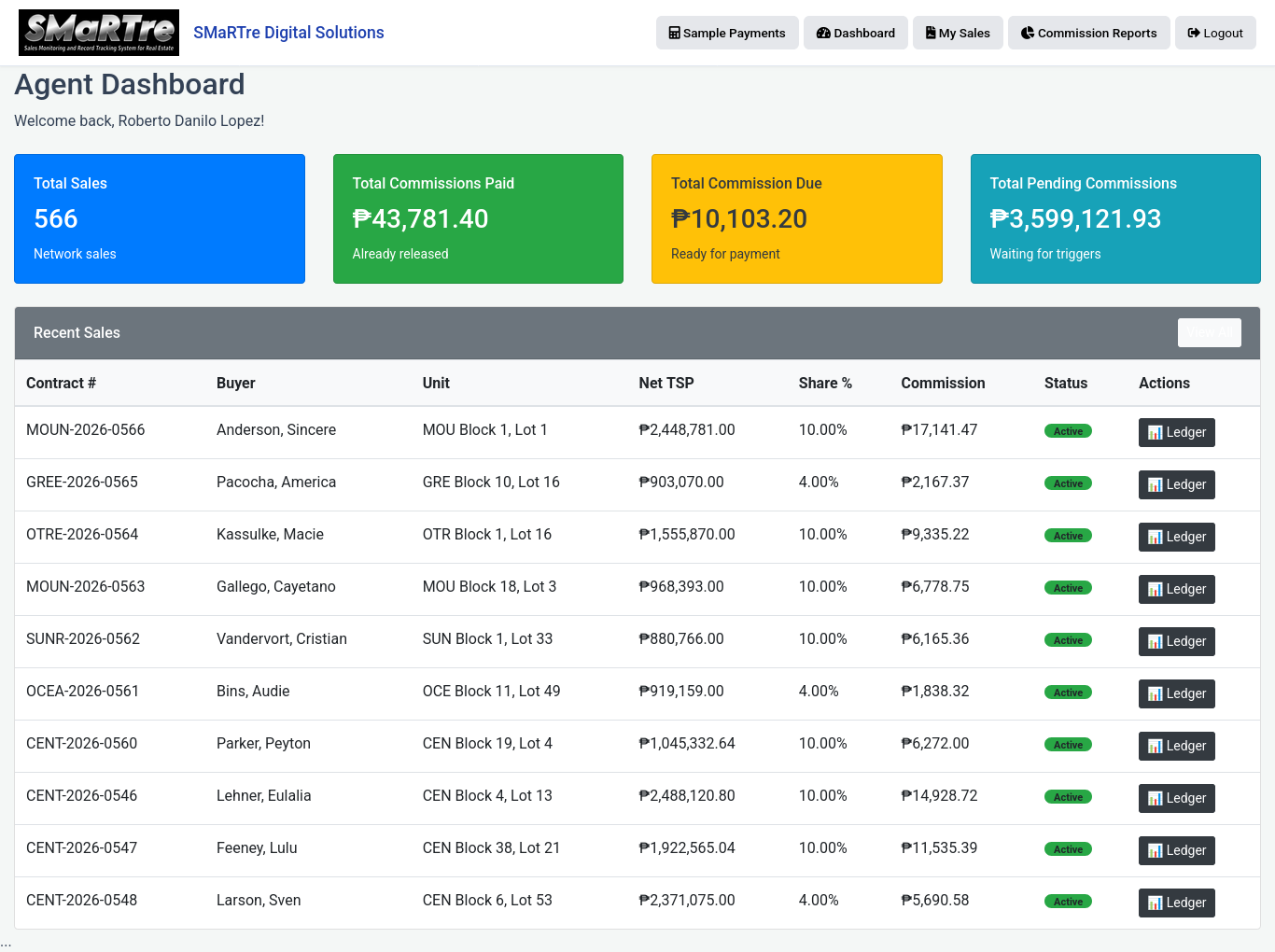
In SMaRTre, this is built-in. You define:
- Commission rules — when does a level trigger? ([ResFee], [TSP] * 0.15, etc.)
- Release formulas — how much per level? (₱5,000, $totalCommission * 0.20, etc.)
- Agent hierarchies — who reports to whom, and what level are they?
The system automatically:
- Tags every payment with a commission trigger level
- Tracks which requirements gate each release
- Shows “Ready for Release” vs. “Not Ready” per agent per release
- Prevents release until BOTH payments AND documents are complete
This is the single biggest reason developers switch to SMaRTre.
Post-Dated Checks (PDCs) Are First-Class Citizens
Real estate in the Philippines runs on PDCs. A buyer issues 60 post-dated checks, one per month, to cover the amortization. Each check can bounce for 15 different reasons. When a check bounces, the payment reverts to pending, the penalty clock restarts, and the commission release gets blocked until the check clears.
Show me how SAP handles this. You’ll need:
- A custom table for check inventory
- Custom batch jobs for maturity monitoring
- Custom workflows for bounce handling
- Custom reports for bank reconciliation
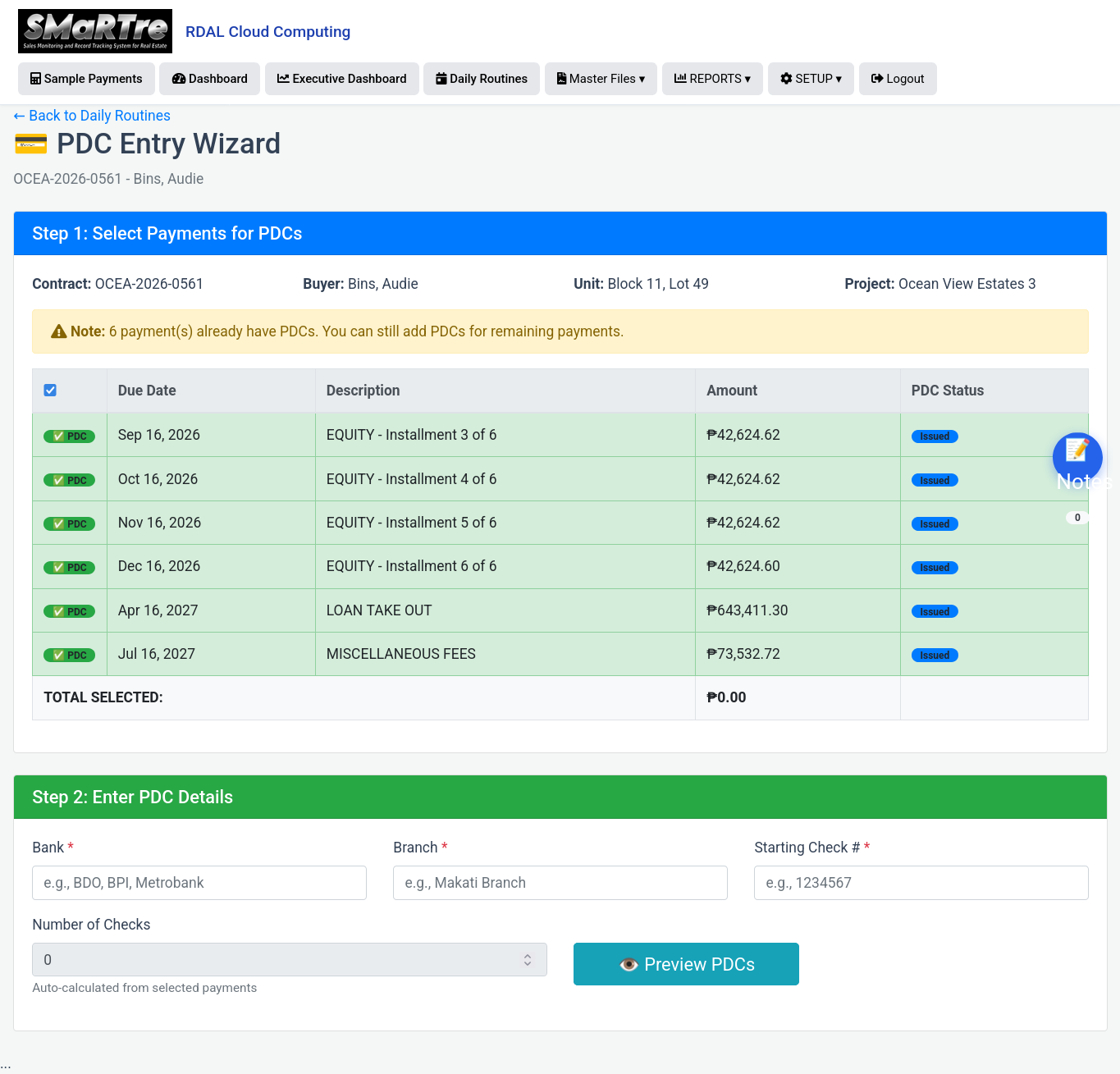
SMaRTre has a PDC module. It lets you:
- Enter checks against a payment in one wizard (bank, branch, starting check #, auto-numbering)
- Track each check’s status: issued → cleared / returned / cancelled
- View PDC maturity calendar (which checks clear this month?)
- Log bounced checks with reason codes and auto-archive to a bounce registry
- Auto-revert payments to pending when a check bounces
- Block commission release until check clears
- Every step is native. No custom code. No consultant. No waiting.
Sales Documentation Is Tracked Per Sale, Per Requirement, Per Responsible Party
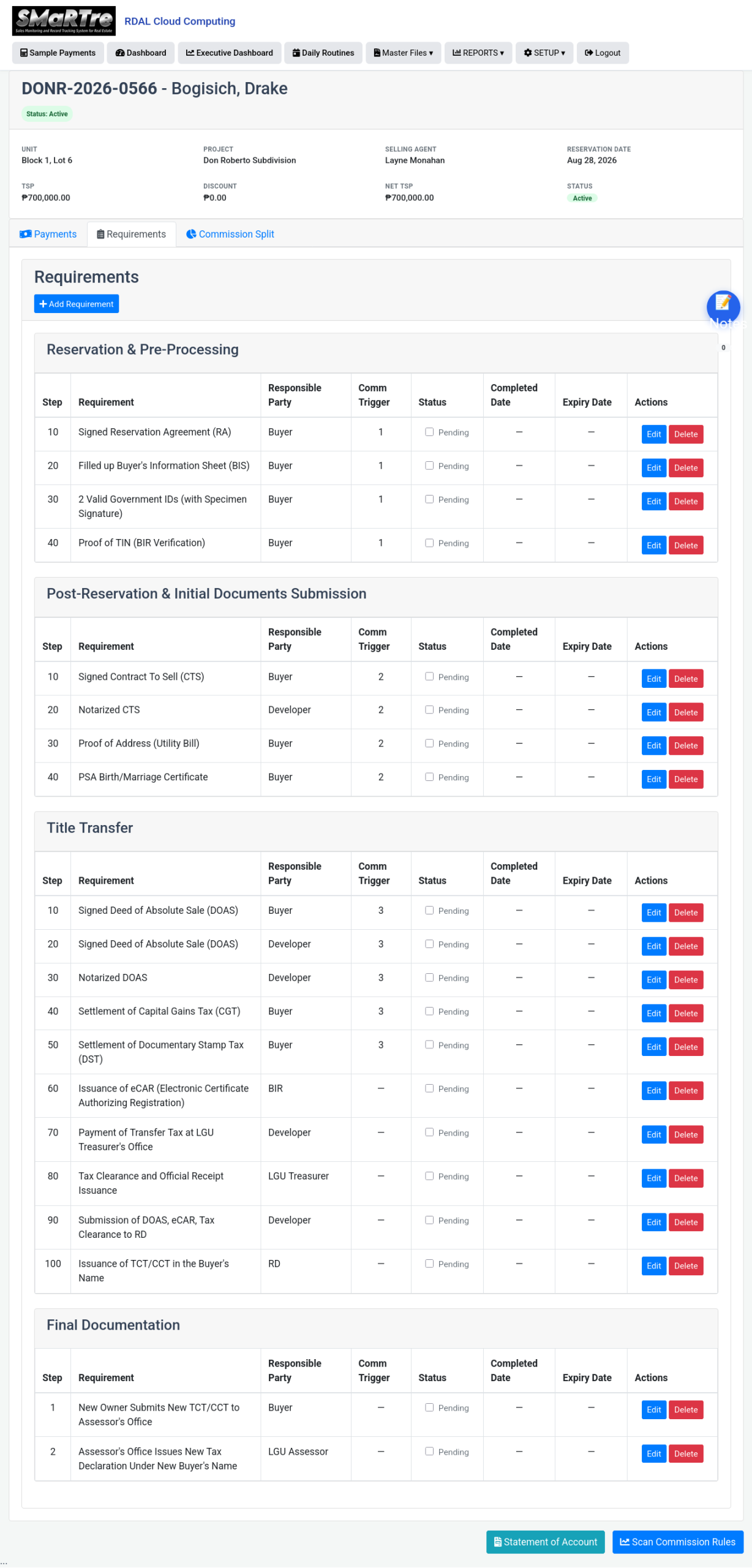
A real estate sale has dozens of documents to complete: signed reservation agreement, notarized DOAS, CGT settlement, DST settlement, eCAR issuance, title transfer, and more. Each document has a responsible party (Buyer, Developer, BIR, LGU, Bank, HDMF, etc.).
In SAP, this is “workflow management” — again, custom-built, expensive, and rigid.
In SMaRTre, we generate the entire document checklist automatically when the sale is created, based on the payment scheme’s process flow. Then we track:
- Which documents are complete
- Who is responsible for each
- Which commission levels they gate
Our Sales Process Report shows you, at a glance: “Out of 26 active sales, how many have completed each requirement?”
Identify Operational Bottlenecks at a Glance
The Sales Process Report doesn’t just tell you what’s complete — it tells you where your operations are stuck. By grouping every requirement by responsible party (Buyer, Developer, BIR, LGU, Bank, HDMF), the report shows you exactly how many active sales are blocked at each step.
Example: “26 of 26 sales have completed ‘Signed DOAS’, but only 0 of 26 have completed ‘Settlement of Capital Gains Tax’. The bottleneck is CGT processing at BIR.”
With this view, operations managers can:
- Identify which step is causing delays across their portfolio
- Determine whether delays are caused by Buyers, Developers, or Government agencies
- Reallocate resources to the bottleneck
- Set realistic expectations with buyers
No ERP for manufacturing has this — because a factory order doesn’t have a “BIR” as a responsible party. Only a real estate system knows that some sales steps are gated by external government agencies, and that the buyer’s timeline depends on how fast those agencies move.
No ERP built for manufacturing has this. Because they weren’t built for this.
The Formula Engine: Real Business Logic, Not a Sandbox
Every other ERP forces you to choose between:
- A rigid system with fixed calculations that requires IT for any change
- A scripting system that runs in a sandbox too limited for real business logic
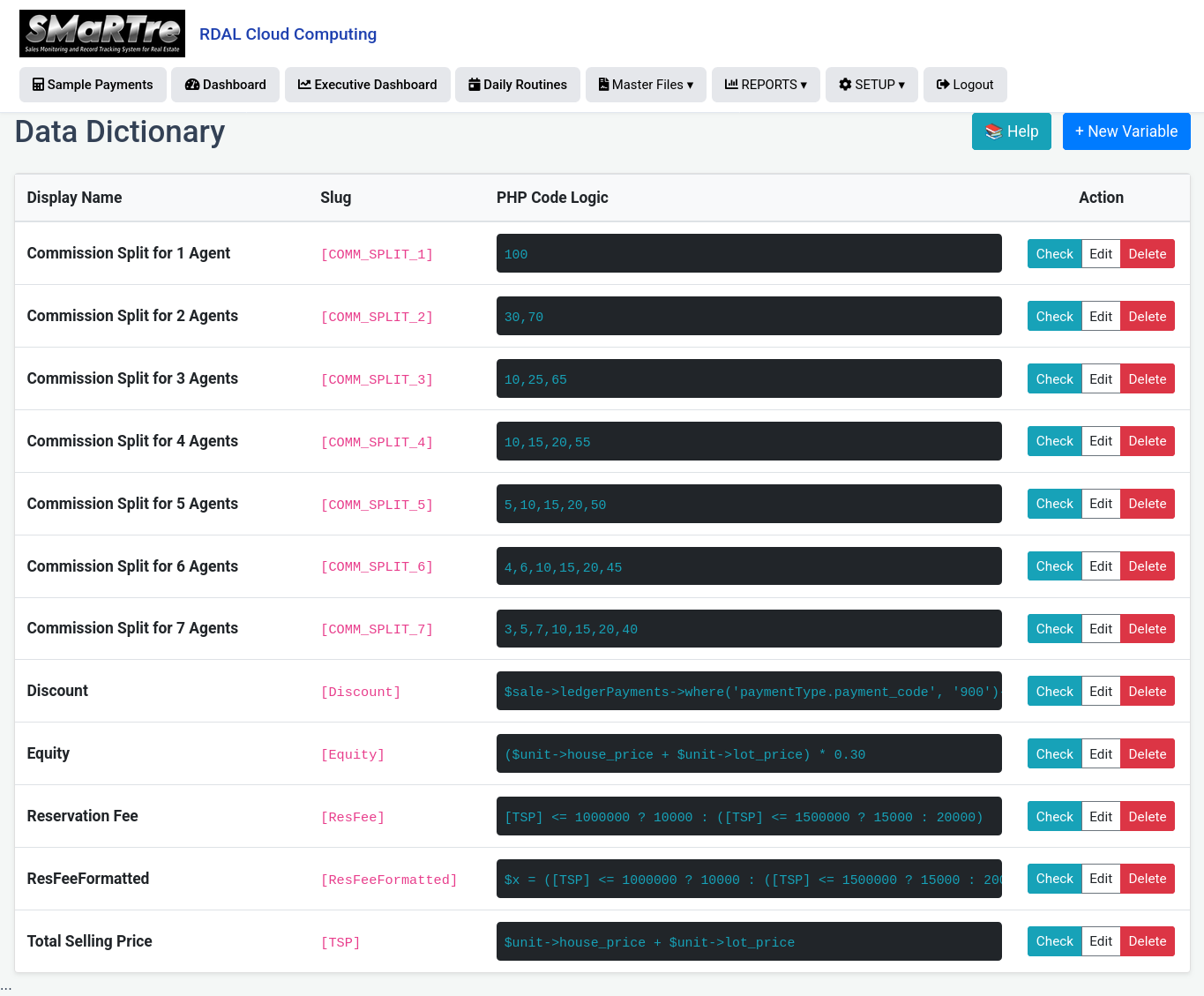
SMaRTre’s Data Dictionary + Formula Engine gives you the power of full PHP logic with the usability of a spreadsheet formula. Admins can create custom variables like:
[COMM_SPLIT_3] → “10,25,65” (commission split for 3-level hierarchy)
[ResFee] → Reservation fee based on TSP tier
[NetTSP] → [TSP] – [Discount]
[Level2Release] → ($totalCommission * 0.20) – 5000
These variables can then be used in:
- Payment scheme formulas
- Commission release formulas
- Pre-printed form fields
- Report calculations
Compare to SAP: adding a new business variable requires a development request, a functional specification, ABAP coding, testing, transport, and deployment. Weeks of work. In SMaRTre, it’s a 5-minute task for an admin.
The Audit Trail Is Automatic and Tamper-Proof
In SAP and Oracle, the audit trail is either:
- Turned off by default (expensive to run)
- Enabled but unusable for compliance (too much noise)
- Configured per table by expensive consultants
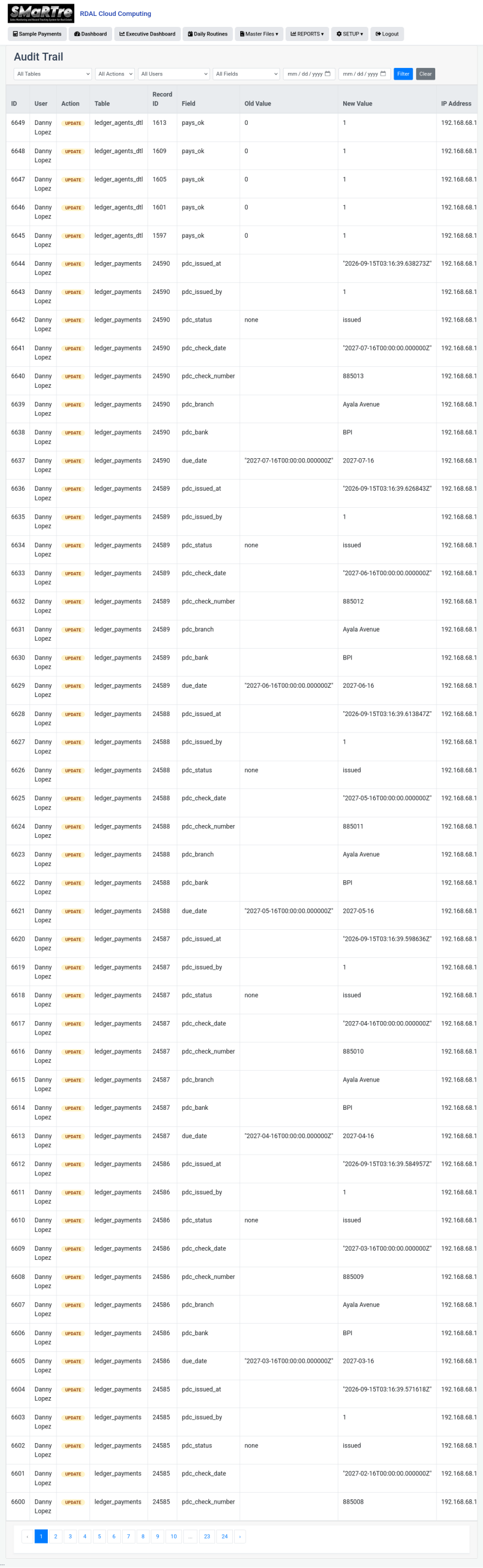
SMaRTre’s Auditable trait logs every create, update, and delete on every tracked model — automatically. It captures:
- Who did it (user)
- What changed (old value → new value)
- When (timestamp)
- From where (IP address)
You get:
- A full audit trail page with filters by user, table, action, field, and date
- Ctrl+F2 popup on any record to see its entire change history
- Storage monitoring with automatic cleanup of old records (90+ days) restricted to Super Admin
- Compliance-ready logs stored efficiently using numeric lookups instead of raw strings
This is not an afterthought. It’s built in from day one.
See the Full Features in action.
Book a walkthrough and we’ll show you SMaRTre running against a real pipeline of deals.